Online Testing Requirements
Is OnVUE the right choice for you? Before you book, all test takers must ensure they can meet the minimum requirements listed below. Failure to do so on exam day can result in immediate exam cancellation and forfeiture of your exam fee.
Before deciding OnVUE is the right choice for your testing needs, locate your exam program and conduct a system test. Please complete this step before exam registration to check compatibility.
Technology
You must provide a suitable device and network to test with, including:
1. A computer running Windows 11, MacOS 14, or higher except company's personal computer
2. A webcam, microphone, and speaker.
3. One display screen only.
4. A minimum internet bandwidth of 20 Mbps or higher.
5.The ability to close all other running applications except for OnVUE.
Some technology cannot be used during the exam:
• Do not use virtual machines or beta versions of Windows or MacOS.
• Do not use phones, tablets, headphones, earbuds, or watches. *
• Do not use secondary displays (they must be disconnected) or touch screens.
• Do not use corporate networks or Virtual Private Networks (VPNs).
Leave time before your appointment to check your computer and network can run an exam remotely:
• Pass a System Test using the equipment and network you will take your exam on.
• Restart your computer to free up resources.
• Remind others not to stream videos or transfer large files.
Testing space
You must show you are in a private space that meets strict test conditions:
1. Make sure that the only items on your desk and at arm's reach are :
• The computer you will take your exam on.
• Items that have been pre-approved for your testing program *, including Comfort Aids.
2. Remove all other items from your desk and at arm's reach, including :
• Books and notes.
• Paper and pens.
• Food and smoking products.
• All other electronics. Disconnect them if you cannot remove them.
3. Clear all note boards and whiteboards in your room.
4. Let others know that you must remain alone, quiet, and free from distraction.
5. Make sure no one else can see what is on your screen, even at a distance.
6. Do not test in a bathroom, while undressed, or in a public space like a library or coffee shop.
Proof of ID
You must confirm your identity when you check-in for your exam:
1. IDs that are expired, digital, copied, paper-based *, or restricted by law, can not be accepted including:
U.S. Department of Defense (DoD) Common Access Card (CAC) or certain secure access IDs.
IDs from countries where OnVUE delivery is restricted: Cuba, Iran, North Korea, Sudan, Syrian Arab Republic (Syria), Russia, Belarus, and certain regions of Ukraine (Donetsk, Luhansk, Sevastopol, Crimea).
* Check to see if any allowances apply to your exam that override the requirements listed above.
2. Under 18s must show their ID, then have a parent or guardian with ID present to give consent for the exam during check-in.
3. Keep a valid, government-issued photo ID matching the name on your booking exactly. We accept:
• International travel passport.
• Plastic driver's license.
• Identification card (national, state, or province ID card).
• Alien registration card (green card or permanent resident/visa).
• Brazilian paper-based driver's license or ID card (Carteira de identidade Nacional).
In Indian ID Proofs, Certain types of Aadhaar card. See below the Aadhaar ID Policy for OnVUE.
Aadhar Card Policy for Indian ID Proofs:
Acceptable Aadhaar IDs
Test-takers in India can present an Aadhaar ID for most exams. Aadhaar IDs must meet the following requirements to be acceptable for in-person or online (OnVUE) testing:
• The ID must be a physical PVC (plastic) card. Laminated paper IDs are not acceptable.
• The ID must be issued by the Unique Identification Authority of India (UIDAI). PVC cards that are not issued by the UIDAI are not acceptable.
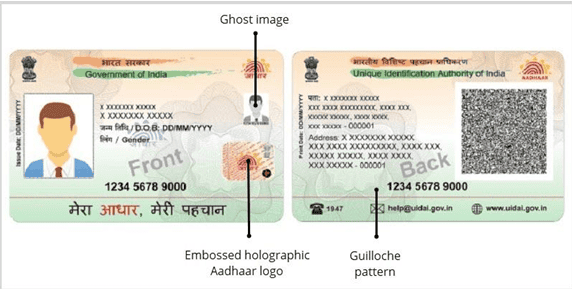
• The ID must have the following elements:
o Your first and last names (which must match the names you used for your test registration)
o Recent, recognizable photo
o Ghost image
o Embossed holographic Aadhaar logo
o Guilloche pattern
The following image shows one example of an acceptable Aadhaar ID:
Testing rules
Arrive on time for your appointment:
1. You can begin check-in up to 30 minutes before your appointment time.
2. If you are more than 15 minutes late for your appointment, you will not be able to check-in.
